
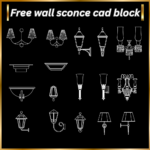
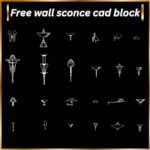

Description
Free Wall Light CAD Block: Perfect DWG Files for Your New Project
Designing with precision has never been easier with our comprehensive free wall light CAD block collection. Whether it’s for residential, commercial, or industrial spaces, wall-mounted lights play a pivotal role in enhancing overall ambiance and functionality. With these expertly crafted CAD blocks, you can download, customize, and integrate professional lighting designs directly into your blueprints.
Why Download Free Wall Light CAD Blocks?
Our free wall light CAD block offerings provide incredible benefits for architects, engineers, and interior designers:
- Time-Saving Utility: No need to design from scratch—just download, customize, and use.
- Professional Precision: DWG files are scaled and optimized for architectural and construction standards.
- Wide Variety: Modern, vintage, and contemporary designs to suit different lighting needs.
- Free Access: Access industry-grade CAD blocks without any cost.
Whether you’re working on AutoCAD, SketchUp, or another drafting tool, these CAD blocks are compatible and easy to use.
Unique Features of Our Free Wall Light CAD Block Files
From classic sconces to modern wall-mounted fixtures, our collection offers:
- Elegant and Chic Designs: Perfect for homes, hotels, or premium office spaces.
- Industrial-Looking Lighting: Ideal for factories, warehouses, or loft-style interiors.
- Outdoor Wall Lights: Perfect for patios, gardens, or exterior building facades.
- Minimalist Fixtures: Sleek, minimalist designs that seamlessly blend with contemporary architecture.
Each CAD block is tailored to industry standards to ensure a perfect fit for any project. Whatever your lighting needs may be, you’ll find files that save you time while ensuring quality.
How to Use a Free Wall Light CAD Block in Your Project?
Getting started is simple and quick. Here’s how you can integrate these blocks:
- Select the free wall light CAD block design that suits your vision from our library.
- Click “Add card” to save the DWG file on your workstation.
- Import the DWG file into your CAD software (AutoCAD, Revit, etc.).
- Scale, rotate, or modify the block as needed to fit your project.


Reviews
There are no reviews yet.